Glossary for the Crossref API Tutorial Series
API pools
API pools are a system of separating the requests made to a public API (like Crossref’s REST API) to offer different levels of priority to different users. Crossref’s REST API uses three pools, which are explained very well by a member of the Crossref team here. For a very brief summary:
Public pool
Anyone can send a request here, and it is the most basic form of interacting with the REST API. It is the most anonymous pool, as you don’t need to provide contact information to use it, but it is also the least prioritized
Polite pool
Requests get routed to the polite pool by providing identifying information in the form of an email address. In reality, this is not meant to identify as much as to contact; you need not use your personal email to use this pool, as long as you regularly check that email address. You will have more lenient rate limits and if one of your automation scripts is taking up too many resources you will receive an email at that address from the team before being blocked.
Although we’ll go into this in more detail later in the tutorial, for those who read the HTTP glossary entry, the way you access this pool is by adding the string “mailto:<valid-email-address>” in an HTTP header called “User-Agent”, or as a parameter in the request like so “mailto=<valid-email-address>”
Plus pool
This is best described by the Crossref team themselves, so I’ll directly quote the forum article:
The plus pool
Some users have credentials they can use to access higher rate limits. There is a cost to accessing the Plus pool, which comes with guarantees for stability and support. One key thing to note is that the data accessed by the Plus pool is exactly the same as the other pools, only the level of service is different.
The queries and filters accessible to Plus users are the same. In addition, they have access to monthly snapshots or all Crossref DOI records in JSON and XML snapshots. Once a year we release a JSON snapshot as a public data file, which is free for anyone to access.
API
Overview from Wikipedia (my emphasis)An application programming interface (API) is a connection between computers or between computer programs. It is a type of software interface, offering a service to other pieces of software. A document or standard that describes how to build such a connection or interface is called an API specification. A computer system that meets this standard is said to implement or expose an API. The term API may refer either to the specification or to the implementation.
In contrast to a user interface, which connects a computer to a person, an application programming interface connects computers or pieces of software to each other. It is not intended to be used directly by a person (the end user) other than a computer programmer who is incorporating it into software. An API is often made up of different parts which act as tools or services that are available to the programmer. A program or a programmer that uses one of these parts is said to call that portion of the API. The calls that make up the API are also known as subroutines, methods, requests, or endpoints. An API specification defines these calls, meaning that it explains how to use or implement them.
One purpose of APIs is to hide the internal details of how a system works, exposing only those parts a programmer will find useful and keeping them consistent even if the internal details later change. An API may be custom-built for a particular pair of systems, or it may be a shared standard allowing interoperability among many systems.
The term API is often used to refer to web APIs, which allow communication between computers that are joined by the internet. There are also APIs for programming languages, software libraries, computer operating systems, and computer hardware. APIs originated in the 1940s, though the term did not emerge until the 1960s and 70s.
It is specificially useful, as a user an an API, to know that: (from IBM)
APIs are predefined interfaces that share only the necessary data and functions for specific queries. Servers do not have to fully expose data—APIs enable the sharing of small packets of data, relevant to the specific request. They keep other internal system details hidden, which helps preserve the integrity of system security
endpoints
Definition coming soon!
HTTP
HTTP (HyperText Transfer Protocol) is a transfer protocol, that is, a set of agreed-upon rules and standards for computers to transfer information between each other over the internet. HTTP (or the encrypted HTTPS) is likely how you are accessing this site right now.1
The protocol is built on a ‘client-server’ model which describes the client (us) sending a request to the server (Crossref, in our case) for some information. The server will read that information (which we sent in a very specific format called an HTTP request) and respond in kind. There are many different kinds of requests a user can make, but the one that is used in Crossref’s REST API is the GET request. When we send our request we will be telling Crossref’s servers that we want to “GET” the metadata corresponding to our query. You may also hear this be called informally a “fetch” request2
The server responds to these GET requests with a HTTP Response which is made up of three parts: a status line, headers, and a message body. In most cases you’ll only ever need to worry about the status line (“Did my request result in an error? Did I type in my query wrong? Is there no article in Crossref’s database matching that DOI?”) and the message body (the returned JSON content).
What a raw HTTP response looks like
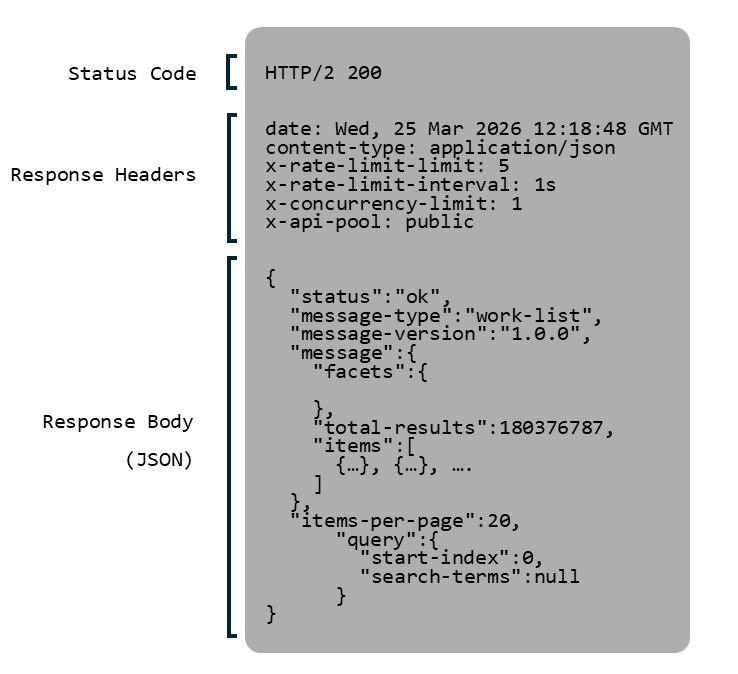
When sending a request, we actually send headers too. This is where information about us, the client, lives. Importantly, this is where you can add contact information in order to be put into the polite pool is. If you are using the crossrefapi python library these headers are set by using the etiquette option (see examples). If you are using the standard requests module instead then you will have to add contact information using the optional headers parameter of the requests.get() method like so:
import requests
requests.get("https://api.crossref.org/works", headers={"user-agent": "mailto=myname@email.com"})
rate limit
Rate limits are limits on the number of requests a user (or ‘client’, in the frequent case that the requests are coming from an automated system) can submit in a given time period. Imposing rate limits allows systems to ensure no one user hogs their resources and that response times are evenly distributed. Different APIs are set up differently; some common consequences for exceeding the rate limit are:
- routing your requests to a different, deprioritized queue (longer wait times)
- timeouts (periods of time where your requests will not be responded to by the server)
- bans (no longer responding to requests from your credentials, either if you identified yourself with an email address or user token, or merely by your IP address)
According to the REST API version 1 documentation, Crossref will return an error message (an HTTP response with status code 429) when they detect request rates exceeding their rate limits, which will effectively timeout your access to the API.
Note that there are technically two parts to the Crossref REST API rate limit system: the concurrency limit (limit on number of requests sent at the same time) and the rate limit (limit of number of requests sent over a given period of time)
More on the most recent changes to Crossref’s REST API rate limits (November 2025)
request
Coming soon!
REST
REST APIs (sometimes called RESTful APIs, with minor differences between the two) are API systems that are designed with particular design philosophy known as a “REST”, which is well described by Red Hat like so (my emphasis and paraphrasing):
REST is a set of architectural constraints, not a protocol or a standard. API developers can implement REST in a variety of ways.
When a [user] request is made via a RESTful API, it transfers a representation of the state of the resource to the requester or endpoint. This information, or representation, is delivered in one of several formats via HTTP: JSON (Javascript Object Notation), HTML, XLT, Python, PHP, or plain text. JSON is the most generally popular file format to use because, despite its name, it’s language-agnostic, as well as readable by both humans and machines.
In general, for the purpose of doing research with scholarly metadata available, knowing about REST principles is not so important. What is important is that it operates over the HTTP web communication protocol (a system for transfering files, including this web page, to users across the internet), and if you have the itch to learn about tecchy topics, your time is probably better spent there. If you’d like to learn more about REST you can read a nice summary by Google here or learn more about REST architecture on Wikipedia here.
server
Coming soon!
software library
Coming soon!
Footnotes
While most of the time browsing the web you will be using HTTP to receive webpage files (*.html files), the Crossref REST API uses the same technology but returns JSON (*.json) files instead↩︎
In python, the popular requests library uses requests.get() and in javascript the corresponding function is fetch, but the HTTP “method” is formally called “GET”↩︎