What’s an API?
Before we go any further, you need to know that there are a lot of ways you can access Crossref’s metadata that don’t involve needing to learn what an API is; in fact, they publish a data file including the entirety of their metadata record database every year.1
You can find details on the other ways to access this data and what use cases they match with here. If you’ve checked out those resources and you’re set on learning to use their APIs (which I think is a great skill and tool to have in your metascience toolbox!), read on.
What the heck is the ‘REST API’?
Yes, I understand. Yet another acronym. In truth, to be a responsible and effective user of this technology, you don’t need to know what it stands for. I’ll oversimply to keep things grounded in the context of our use case:
The most common way you’ll interact with one of Crossref’s APIs is by submitting a request for some amount of metadata. Unsurprisingly this is called making an “API request” also informally described as an “API call”.2 This request is sent over the internet to a computer maintained by Crossref called a server which serves you back the data you requested.
You’ll also likely want a specific subset of data relevant to your research question, so you’ll want to specify your requests by using search query. Often you’ll get back more information than you need, or in a different order than you want, so you’ll also want to be able to filter and sort. You may even want to get a summary of the data. For these reasons, you’ll want to use specifically the REST API. For the purposes of getting started on doing research with Crossref’s metadata, it suffices for now to say that the REST API is a specific way of accessing Crossref’s metadata that has the following important distinguishing characteristics:
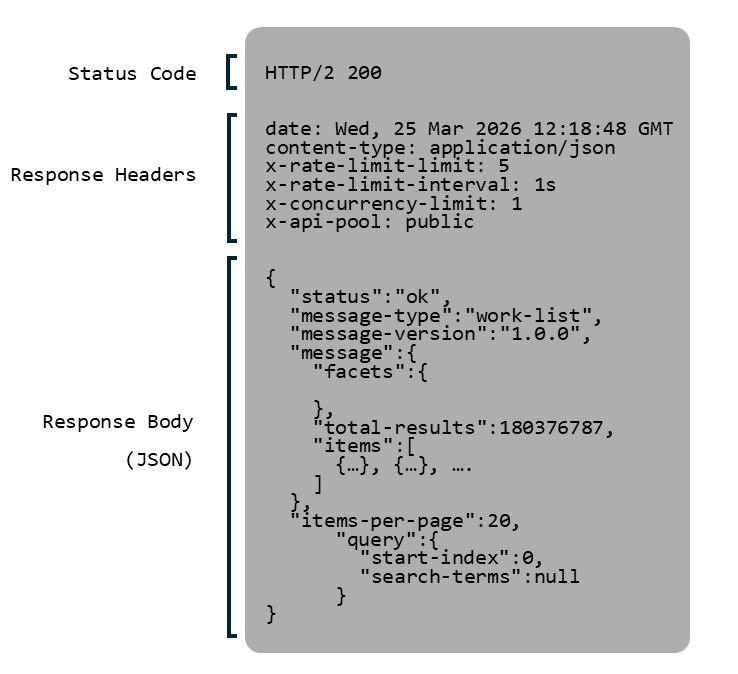
Data requested is returned to us in a data format called JSON
There are TONS of users of this specific API, each making loads of requests per second
- According to Crossref, of the 2 billion combined requests their public APIs receive per month, around half are made to the REST API alone.
- In order to continue to make this service accessible to everyone who uses it, Crossref imposes a rate limit which limits the number of requests you can make per second3
- To be a responsible user of this service, you need to respect the rate limits This means that when you begin to automate your requests through analysis scripts, you follow the steps I list out in order to make sure you do not send too many automated requests at one time.4. This means that unlike reading from a ‘local’ data file saved on your computer, you may have to wait to receive all of the data you requested
- Beyond rate limits, consider the amount of data you are receiving per request. Requests that are unspecific or which use very broad query terms may return far more data than you actually want and will cause unnecessary strain on the system. For this reason we will discuss queries and filtering at length in the upcoming articles
Each request is 'stateless' that is, every request for data is independent and there's no 'memory' of previous requests
A small caveat
- To understand the implications of this feature, it may help to have a slightly deeper understanding of the technology being used behind the REST API (and I cannot stress ‘slightly’ enough…internet communication protocols can get very technical very quickly), so reading up on the HTTP protocol may help. In practice, however, what statelessness means for you is that you need to plan out requests and test in small batches before automating things as realizing you need to add one additional metadata field to a request will result in the server retrieving everything again, not just the new data you’re interested in.
Requests can only be made for one category of record at a time
- They have as of April 2026 7 different categories of metadata record you can request, each representing a unique type of object which they record metadata about
- While the record categories are closely connected (publishers publish articles in journals, for example) and some information about one category you can surmise by working up the relationship tree (metadata about a work will include the journal, e.g.), each record has some unique metadata fields5
- The most numerous record type is Work, which is very flexible and you can often find a lot by analyzing records of this category, still…
- You will have to learn how to request specifically a certain category of record if you want access to these specific metadata fields.
The data it provides can be requested, retrieved, and read using nothing more than an internet browser tab
Enough reading, let’s try it!
End notes
- To be more accurate, large companies like Crossref likely don’t use one computer to act as their server. In practice, what looks like a single ‘endpoint’ (the place we send our requests) to us users may be a collection of many computers, where our request gets ‘routed’ to one that is not busy with other requests.
- There is actually more than one rate limit. The limit applied to your request depends on a number of factors, like whether you’ve identified the purpose of your request and offered contact information or if you’re a paying subscriber to their Metadata Plus
- It may not be exactly true that the server will retrieve EVERYTHING again, as there may be some internal caching(storing data you recently requested in an intermediate location so you don’t need to do the full lookup again to retrieve it again) mechanisms that I’m not familiar with, but across the publicly available documentation Crossref continually emphasizes that the responsibility for caching results lies with the API user
- Warning: this info may not make sense until later in the tutorial but I leave it here for accuracy: I wrote that there are 7 types of record available for request. In this series I use ‘types of record’ as a more user-friendly way of referring to different categories/abstract representations of data that are available through the 7 different endpoints which can be requested. There are much more than 7 different types of scholarly Works records, for example. Moreover, currently there are only 2 fields of metadata available from the Prefixes, Licenses, and Types endpoints and this information can be mostly discovered by using filters on other endpoints like Works. In practice, you can think of there being 4 categories of record mainly in use; Works, Members, Journals, Funders.
Footnotes
This data file is huge, over 200 GB, and if you want to do research on your personal computer it’s not easy to work with. Though there are various ways to download it, some of them are quite technical and none of them are as simple as downloading a .csv from a public repository like you may be used to. If you want to get an idea of what the data looks like, they released a sample here. The free method I used took something like 16 hours to get onto my device↩︎
In the sense that you call out to it with a request and it responds↩︎
As recent as November 2025 they have had to rebalance their rate limits to deal with an increasing load of requests. For reference, currently (as of 2026-03-25) public pool users are limited to 5 requests per second↩︎
There is a technical distinction between the number of requests at one time (concurrency limit) and the number of requests within a time period (rate limit). Current limits can be found here↩︎
See my short article on JSON to learn more about metadata fields↩︎
Once we talk about combining facets and queries you will see another, theoretically imperfect but practically identical way of getting this information by searching through the Works category, but it’s good to learn to follow the structure of the API.↩︎
While most of the time browsing the web you will be using HTTP to receive webpage files (*.html files), the Crossref REST API uses the same technology but returns JSON (*.json) files instead↩︎
In python, the popular requests library uses requests.get() and in javascript the corresponding function is fetch, but the HTTP “method” is formally called “GET”↩︎